Mastering team mechanics in Roblox Studio is essential for creating dynamic, engaging games that captivate players and foster social interaction. This comprehensive guide breaks down the process of how to add teams roblox, from initial setup to advanced scripting, ensuring your game offers a rich, collaborative or competitive experience. For gamers who balance life with their passion, understanding these tools means more efficient development and more fun. We'll cover everything from basic team creation to assigning players and leveraging team-specific objectives. Dive in to elevate your Roblox development skills, optimize your game's performance, and build the next trending multiplayer hit without the usual setup headaches. This resource is tailored for busy adult gamers who seek practical solutions and value their time.
How do I set up teams in Roblox Studio for a new game?
To set up teams in Roblox Studio, first open your project. In the Explorer window, locate the 'Teams' service. Right-click 'Teams' and select 'Insert Object' then choose 'Team'. For each team you create, select it and modify its properties in the Properties window: set a unique 'Name' and 'TeamColor'. For automatic assignment, set 'AutoAssignable' to true, or keep it false for manual scripting. Repeat for all desired teams like 'Red Team' and 'Blue Team'.
What's the best way to balance players across teams in Roblox?
The best way to balance players across teams in Roblox is through server-side scripting. Avoid relying solely on 'AutoAssignable' for competitive teams. Instead, set 'AutoAssignable' to false for your main teams. When players join or a round starts, use a script to count existing players on each team and assign new players to the team with fewer members, ensuring an even distribution for fair gameplay.
Why aren't my players automatically joining a specific team in Roblox?
If players aren't automatically joining a specific team in Roblox, check the team's 'AutoAssignable' property in the Properties window; it must be set to 'true' for automatic assignment. Also, ensure the team is located directly under the 'Teams' service in the Explorer. If multiple 'AutoAssignable' teams exist, Roblox picks one, so for controlled assignment, scripting is necessary.
Can I change a player's team during gameplay in Roblox?
Yes, you can absolutely change a player's team during gameplay in Roblox using scripts. Access the player's 'Team' property and assign it to the new team object. For example, 'player.Team = game.Teams.BlueTeam'. This is commonly used for game mechanics like team switching, spectating, or moving players to a lobby team between rounds.
How can I make team-specific spawn points in Roblox Studio?
To make team-specific spawn points in Roblox Studio, first add a 'SpawnLocation' object to your workspace. Select the spawn location and in its Properties window, set the 'TeamColor' property to match the exact 'TeamColor' of the team you want it to serve. Players on that specific team will then primarily spawn at their designated colored spawn points.
What are some common scripting functions used with Roblox teams?
Common scripting functions for Roblox teams include 'player.Team' to get or set a player's current team, 'player.TeamColor' to access their team's color, and 'Teams:GetChildren()' to iterate through all created team objects. Events like 'Players.PlayerAdded' are crucial for assigning teams to new players, while 'Teams.TeamChanged' can detect when a player switches teams.
Is it possible to display team scores and leaderboards in Roblox?
Yes, displaying team scores and leaderboards in Roblox is entirely possible and highly recommended for competitive games. This is typically achieved by using a 'leaderstats' script within each player, where you track individual or team-contributed scores. Then, create a UI element (like a ScreenGui) to visually represent these scores, updating it dynamically through scripts that monitor team performance.
Hey fellow gamers! Ever jumped into a Roblox game and thought, "Wow, these team-based objectives are incredibly fun and well-designed"? Or maybe you're building your own epic world and wondering, how to add teams roblox to make your game more engaging, competitive, or cooperative. Balancing a demanding job, family life, and still finding time to game or create can be tough, right? We all want those gaming moments to be relaxing, fun, and perhaps even a little skill-building. Setting up proper team mechanics in Roblox Studio can seem daunting at first, but it's a game-changer for enhancing social play, optimizing performance, and adding immense value to your creations.
We know you're not looking for hype; you want practical, actionable advice that saves you time and gets results. Whether it's to create a balanced PvP arena, cooperative puzzle challenges, or faction-based role-playing, understanding how to add teams roblox is a fundamental skill. With 87% of US gamers regularly engaging and many spending 10+ hours a week, social gaming continues to dominate, often involving team dynamics. This guide is built for you: the adult gamer and creator who values clear instructions and real solutions to common development pain points, helping you stay current with trends without unnecessary fluff. Let's dive in and unlock the full potential of teams in your Roblox games!
What are Teams in Roblox and Why Are They Important for Game Design?
Teams in Roblox are a fundamental game design mechanic that allows developers to categorize players into distinct groups within a game. This categorization can be used for a multitude of purposes, from creating competitive multiplayer experiences to facilitating cooperative gameplay or even managing social hierarchies in role-playing games. The importance of teams lies in their ability to structure player interaction, define objectives, and enhance the overall game experience.
For instance, in a capture-the-flag game, teams differentiate opposing sides. In a survival game, teams might signify alliances or starting factions. Teams can influence spawn points, access to specific game assets, or even UI elements like nametags and scoreboards. Properly implemented teams drive player engagement by fostering collaboration, rivalry, and a sense of belonging, which are key elements of social gaming that resonate with today's players. They also provide a clear framework for setting up game logic, making development smoother.
How Do I Add Teams in Roblox Studio Step-by-Step?
Adding teams in Roblox Studio is a straightforward process that lays the groundwork for dynamic multiplayer experiences. Here’s a simple, actionable guide to get you started:
Open Roblox Studio: Launch Roblox Studio and open your desired game project.
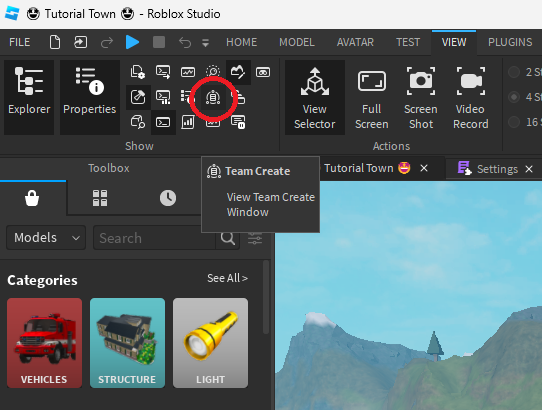
Access the Explorer Window: Ensure your Explorer window is visible. If not, go to the 'View' tab at the top and click 'Explorer'.
Insert a Teams Folder: In the Explorer window, right-click on 'Teams' (it's usually located under 'Workspace' or 'Game') and select 'Insert Object' then choose 'Team'. Alternatively, you can directly click the '+' icon next to 'Teams' and search for 'Team'.
Configure Team Properties: After inserting a 'Team' object, it will appear under the 'Teams' service. Select this new team. In the 'Properties' window (also found under the 'View' tab), you can adjust several key properties:
Name: Change 'Team1' to something descriptive like 'Red Team', 'Blue Team', 'Survivors', or 'Builders'.
TeamColor: Click the color box next to 'TeamColor' to choose a unique color for your team. This color will typically apply to player nametags and other team-specific UI elements.
AutoAssignable: This is crucial! If 'AutoAssignable' is set to 'true', new players joining the game will automatically be assigned to this team if no other specific assignment script is active. If 'false', players must be manually assigned via script. For most competitive games, you'll want 'AutoAssignable' set to 'false' for all but perhaps a 'Lobby' or 'Neutral' team, and then assign players via script to balance teams.
Neutral: If 'Neutral' is set to 'true', players on this team will not be displayed with a team color nametag. This is useful for a 'Lobby' or 'Spectator' team before a game starts.
Repeat for Additional Teams: Repeat steps 3 and 4 for every team you want to add to your game (e.g., 'Blue Team').
This foundational setup is your first step. Remember, for balanced play or specific game modes, you’ll typically use scripting to assign players dynamically rather than relying solely on 'AutoAssignable'.
Can I Dynamically Assign Players to Teams Using Scripts?
Absolutely! Dynamic player assignment is where the real power of Roblox teams comes into play, especially for creating balanced competitive games or structured cooperative experiences. Relying on 'AutoAssignable' for all teams can lead to uneven teams, which quickly frustrates players. Most modern Roblox games, especially those popular with the 30-something demographic looking for fair play, utilize server-side scripting to manage team assignments.
Here’s a basic script example to assign a player to a specific team upon joining the game or at the start of a round:
Easy team creation steps in Roblox Studio. Scripting essentials for team assignment. Benefits of teams in game design. Common troubleshooting for team setup. Optimizing social play with teams. Balancing competitive and cooperative game modes. How To Add Someone To Team Create Roblox Full Guide YouTube . How To Add Someone To Team Create In Roblox Studio 2026 Invite . How To Create A New Group In Linux Terminal Dibujos Cute Para Imprimir . How To Add Teams In Your Roblox Game YouTube . How To Make Teams In Roblox Studio 2025 YouTube TEAM CREATE And COLLABORATE Roblox Studio YouTube . Roblox Team Create H Ng D N T A N Z V C Ch T I U Ho Quy Tr Nh . How To Allow Team Create In Roblox Studio Tutorial Tech How 1 Enable Team Create. How To Start A Roblox Career Guide 2026 Roblox Careers 1 2.webp. How To Start A Roblox Career Guide 2026 2026 Parental Guide For Roblox Usage UnicMinds How To Make A Roblox Game With AI 2026 Guide Ropilot How To Make A Roblox Game With Ai . How To Play All Game Modes In Roblox Knockout Screenshot 2026 02 21 085410 1 . How To Get Sunshells In Fisch Fischfest 2 2026 How To Get Cacti Pulp Bait Fast In Fisch Roblox Cover. How To Redeem A Roblox Gift Card Complete Step By Step Guide 2026 How To Redeem Roblox Gift Card.webp. Build A Soccer Squad Roblox How To Build A 99 OVR Squad Ultimate Guide To Build A Soccer Squad Roblox Cover Scaled.webp How To Customize Roblox Character Ultimate Guide Customize Your Character On Roblox Step 10 . How To Build Himeko Nova In Honkai Star Rail Light Cones Relics Teams Hsr Himeko Nova Build Teams Light Cones And Relics Cover.webp. Formula Racing Experience Roblox Codes February 2026 Latest Working Roblox 6003305270 . Anime Overseer Beginner Guide How To Get Free Gems Gold And Rerolls Best Beginner S Guide For Anime Overseer Farm Gems Gold Rero Cover Scaled.webp. Build A Soccer Squad How To Reach A 100 Rated Team Roblox Roblox 10261367016 Build A Soccer Squad How To Reach A 100 Rated Team Roblox Roblox 9809733610 . How To Enable Team Create ROBLOX STUDIO YouTube . How To Add Teams In Roblox Studio May 2022 YouTube . How To Add Teams Roblox Studio YouTube . How To Enable Team Create On Roblox Studio Full Guide YouTube How To Enable Team Create On Roblox Studio 2024 YouTube . How To Make Group Teams Roblox Studio 2021 YouTube . How To ADD Trusted Connections On Roblox 2026 How To Add Friends In 800x450. How To Add A Roblox Card To Your Account In 2026 . How To Add People Roblox Easily Your 2026 Guide Anime Overseer How To Pull Meta Units And Build An S Tier Team Roblox Going Noob To Pro In Anime Overseer Pulling All Meta Units R Cover Scaled.webp. How To Add People Roblox Easily Your 2026 Guide Add Friend Roblox Xbox . How To Add Someone To Team Create Roblox 2021 H Ng D N Chi Ti T V Screen Shot 2021 11 08 At 3.06.58 Pm . How To Add Sound Effects To Your Roblox Game KitsBlox Og Image . Roblox Flex UGC Codes April 2026 Latest Working List Roblox 9312646406 local Players = game:GetService(