Uncover the secrets of your Steam game installation folder a vital hub for every PC gamer Navigating your Steam library can seem daunting especially when you are balancing a career family and personal life but understanding where your games live is crucial for optimal performance modding and troubleshooting Discover how to easily locate manage and even move your Steam game installation folder to free up space enhance game performance or prepare for a fresh install This guide offers practical solutions for common gamer pain points helping you spend less time configuring and more time enjoying your favorite titles It addresses questions about multiple library folders manual game moves and optimizing storage on a budget keeping you updated with essential gaming knowledge without the hype Stay informed and in control of your digital gaming universe making your gaming sessions smoother and more enjoyable
How to locate your Steam game installation folder?
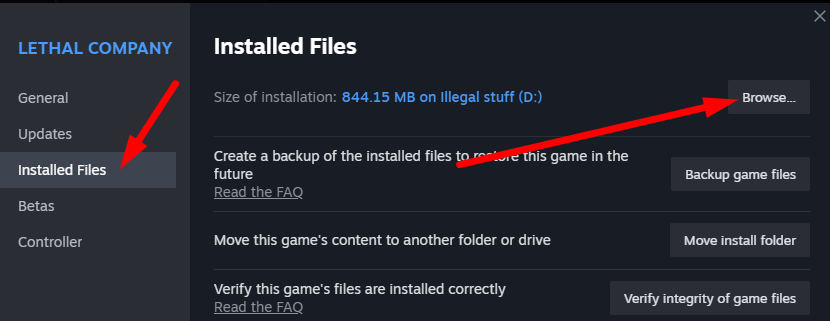
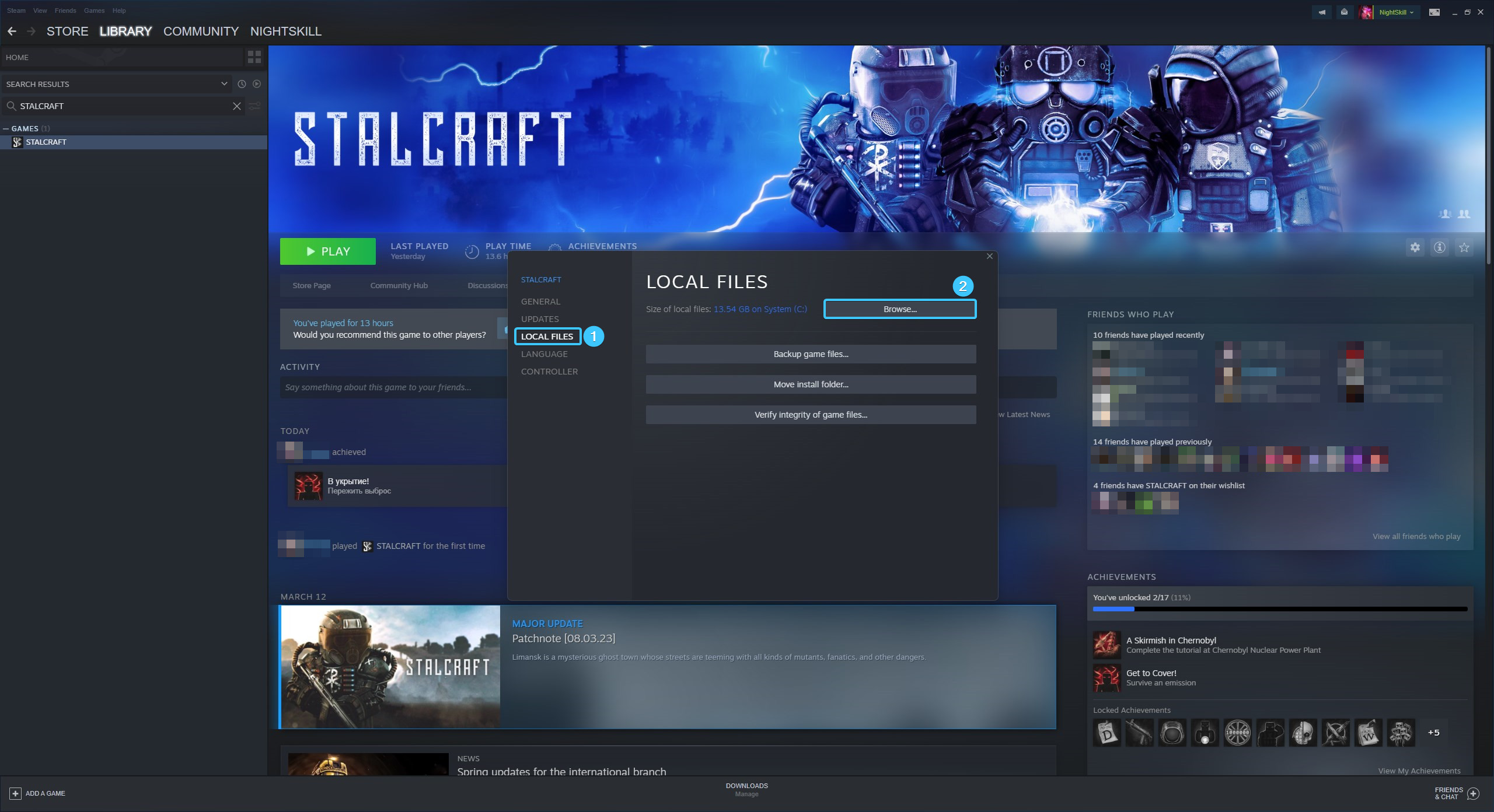
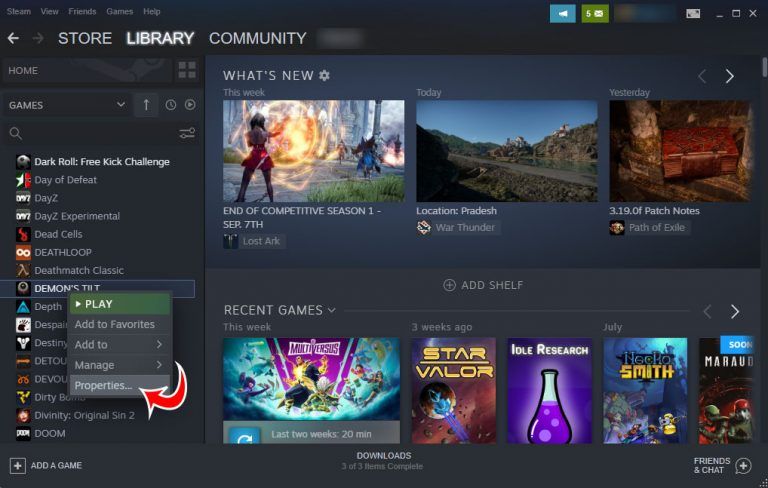
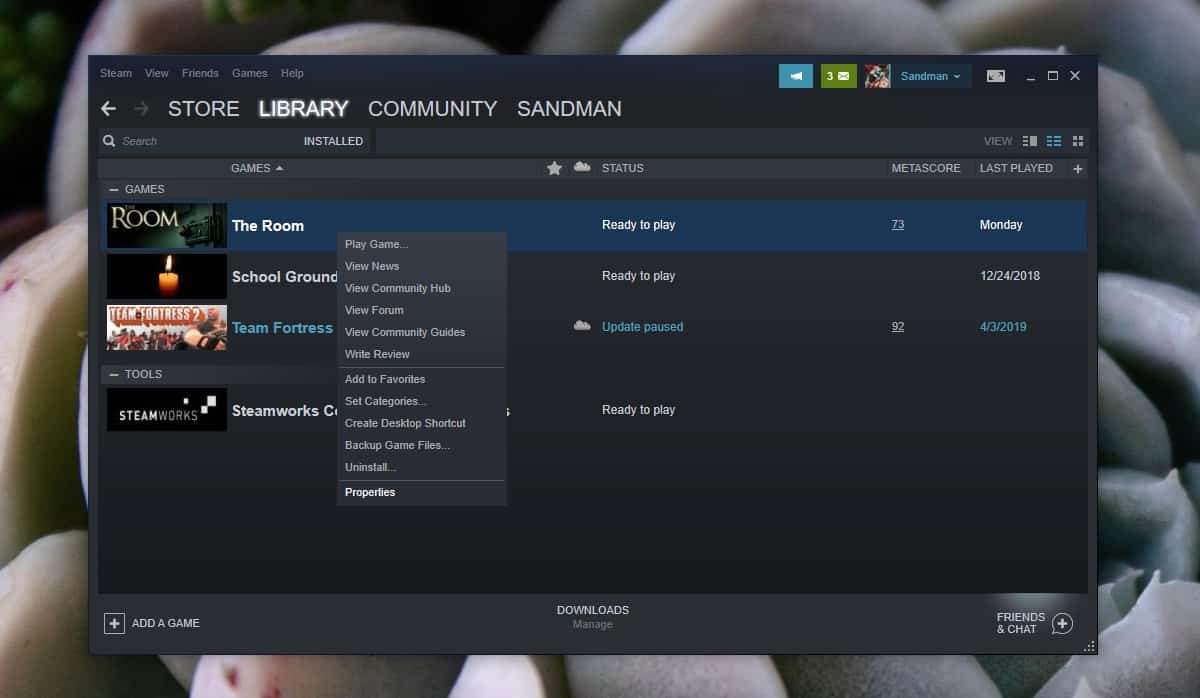
The easiest way to locate your Steam game installation folder is through the Steam client itself. Right-click on any game in your Steam Library, select 'Manage', then click 'Browse local files'. This action directly opens the game's folder, which resides within your main Steam installation directory, usually 'C:\Program Files (x86)\Steam' or your custom location.
Why is the default Steam game folder path important?
The default Steam game folder path, typically 'C:\Program Files (x86)\Steam', is important because it's where Steam will attempt to install games if you haven't specified another 'Steam Library Folder'. Knowing this path helps in troubleshooting, manual file access, and ensuring software or antivirus programs can correctly interact with your Steam client and games without issues.
Can you move Steam games to another drive?
Yes, you can absolutely move Steam games to another drive without reinstalling them. Steam has a built-in feature in its 'Settings' under 'Storage' that allows you to select games and move them between different 'Steam Library Folders' located on various drives. This is ideal for freeing up space or moving games to a faster SSD.
What are Steam Library Folders and how do they work?
Steam Library Folders are specific directories you designate for Steam to install games. You can create multiple folders across different drives, which Steam then recognizes as valid installation locations. When you install a new game, you can choose which Library Folder to use, helping you manage storage and optimize game placement for performance.
Is it safe to manually delete game files from the folder?
Manually deleting game files directly from the Steam game installation folder is generally not safe and can lead to corrupted installations. Steam relies on precise file integrity. If you need to remove a game, always uninstall it through the Steam client (Right-click game in Library > Manage > Uninstall) to ensure all related files are properly removed and Steam's records are updated.
How does modding interact with the Steam game installation folder?
Modding heavily interacts with the Steam game installation folder because most mods require placing custom files directly into specific subdirectories within a game's installation folder. Whether it's custom textures, scripts, or new assets, knowing the exact location of your game's files is crucial for correct mod installation and troubleshooting.
What to do if Steam cant find installed games?
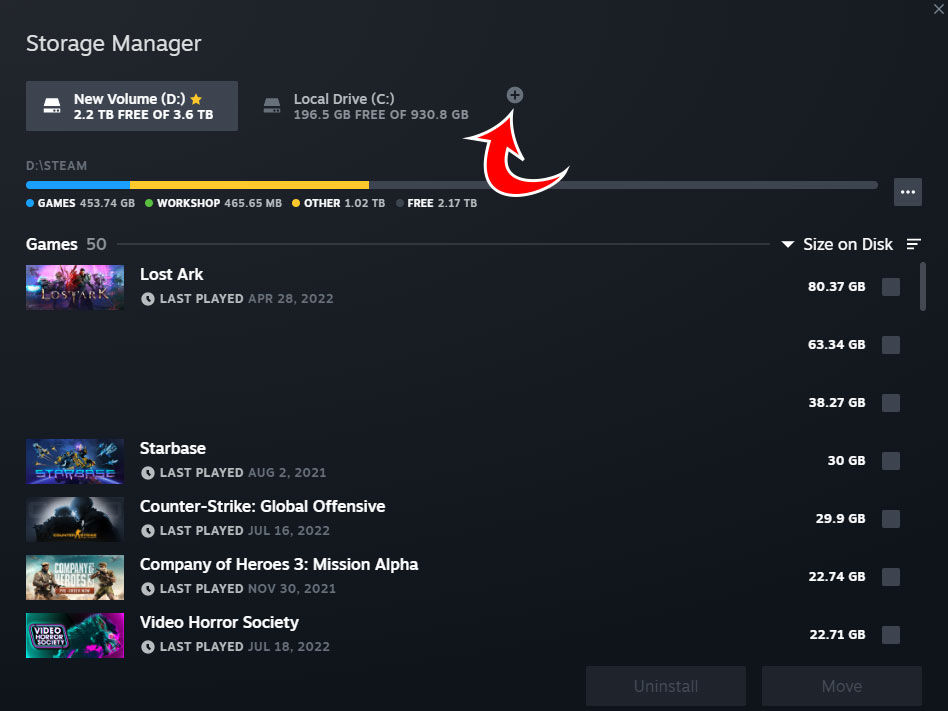
If Steam cant find your installed games, first open Steam 'Settings' and go to 'Storage'. Click the '+' icon to 'Add a New Drive' and navigate to the drive and folder where your games are actually installed (e.g., 'D:\SteamLibrary'). Steam will then scan this location and re-add the games to your library, making them playable again without redownloading.
Hey fellow gamers Ever felt that familiar pang of frustration when you want to mod a game troubleshoot an issue or simply free up some much-needed disk space but you just cant seem to find where Steam hid your precious game files Youre not alone In fact with 87 percent of US gamers regularly diving into their digital worlds often dedicating 10 plus hours a week efficient game management is more crucial than ever especially for those of us balancing gaming with jobs families and other life commitments We value our relaxation time and we want our games to work seamlessly right
Understanding your Steam game installation folder is not just for the tech-savvy Its a fundamental skill that empowers you to take control of your gaming experience from performance optimization to embracing creative mods This guide is designed to be your trusted friend in navigating the digital maze offering practical no-nonsense solutions to common pain points We cut through the hype to give you actionable advice helping you keep your gaming setup running smoothly so you can focus on building skills conquering new worlds or simply unwinding with friends after a long day Ready to master your Steam game library Lets dive in and unlock the full potential of your gaming rig
What Exactly Is the Steam Game Installation Folder?
The Steam game installation folder is essentially the digital home for all the games youve downloaded through Steam Think of it as a meticulously organized digital cabinet where every game executable every asset file every save game and every mod you install resides When you click Play on a game Steam knows exactly where to find all the necessary components to launch and run it smoothly This primary folder is critical because it houses the core structure that Steam uses to verify game files apply updates and manage your entire library Its more than just a storage location its the operational heart of your Steam gaming experience.
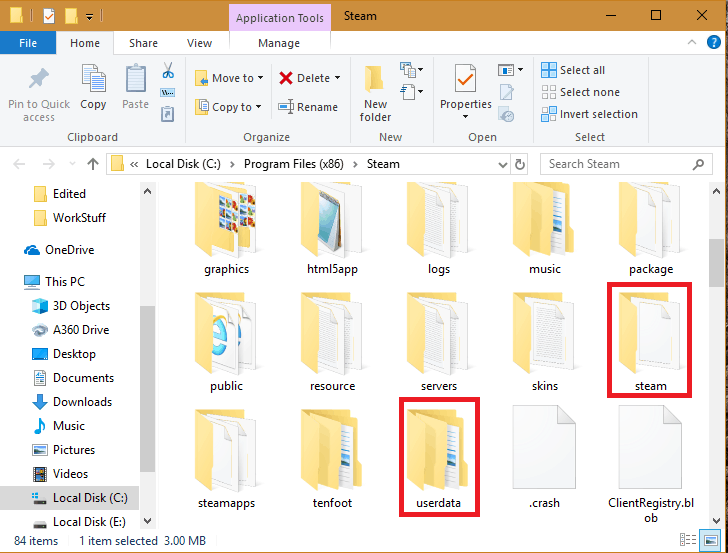
Understanding its structure is key not just for basic management but for more advanced tasks too Inside this main folder youll typically find a SteamApps subfolder which contains all your actual game data including common game files and individual game folders identified by App IDs It also holds your manifest files which tell Steam important details about each game like its version and integrity Knowing this precise location is the first step towards taking full control of your PC gaming environment allowing for everything from simple backups to complex mod installations without disrupting your game files.
How Do I Locate My Steam Game Installation Folder?
Finding your Steam game installation folder is straightforward and can be done in a few simple ways The easiest method involves using the Steam client itself which many busy gamers appreciate for its convenience and reliability.
- Open your Steam client.
- Go to your Library.
- Right-click on any installed game (e.g. Elden Ring or Palworld popular this month).
- Select Manage then Browse local files.
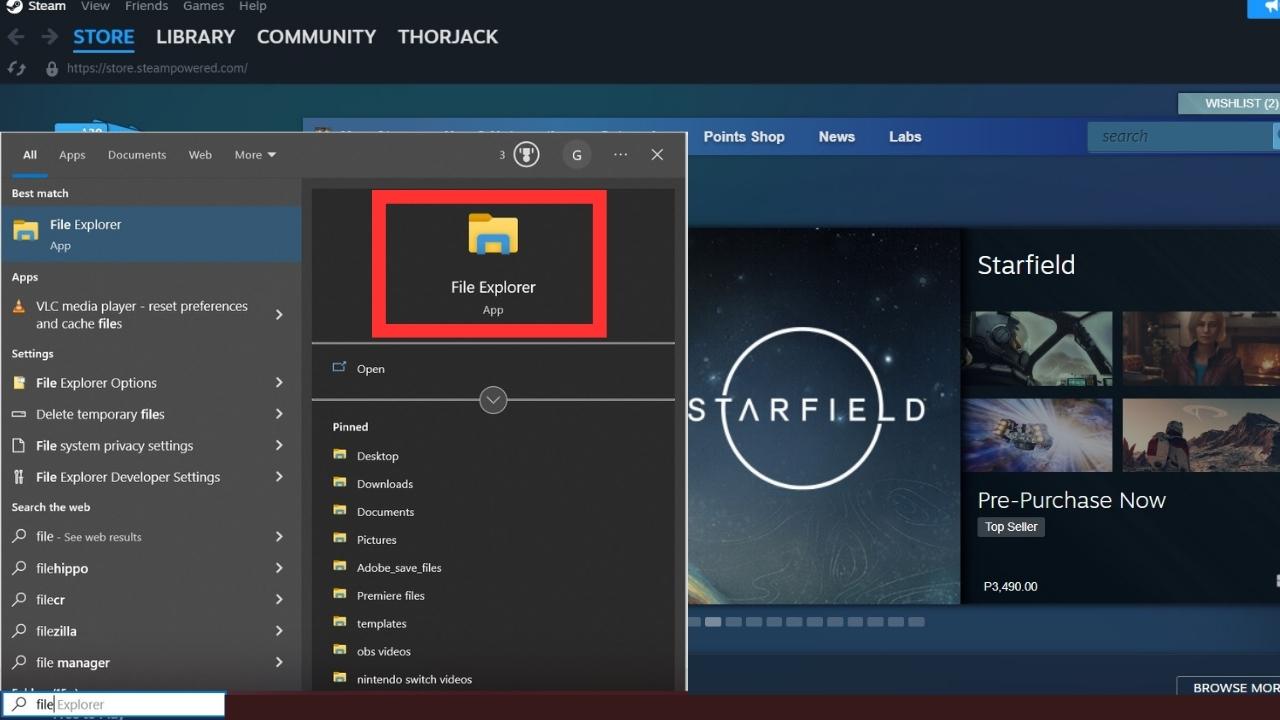
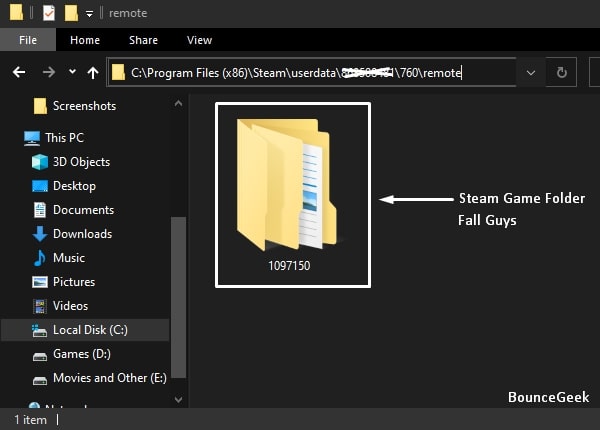
This will immediately open a File Explorer window directly to the game's specific folder which is usually located within the main Steam game installation folder. If you need to navigate to the primary Steam folder just go up one or two levels in the file path. Typically on Windows it resides in CProgram Files x86Steam or a custom location you set during installation On macOS it's often in UsersYourUsernameLibraryApplication SupportSteam.
Can I Change Where Steam Installs Games? Absolutely
Yes you absolutely can and should consider changing where Steam installs your games especially if your primary drive is an older HDD or running low on space Many gamers find themselves needing to free up space for work documents family photos or even other games on their main SSD and moving your Steam library can be a performance game-changer With average game sizes continually increasing managing storage is a constant battle for the modern gamer.
To change the default installation path:
- Open your Steam client.
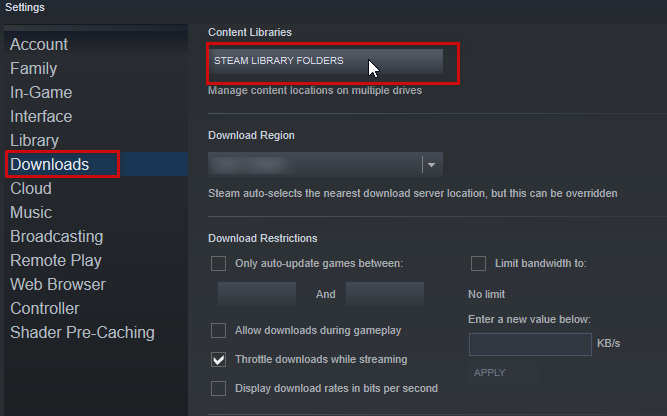
- Click Steam in the top-left corner then go to Settings.
- Select Storage from the left-hand menu.
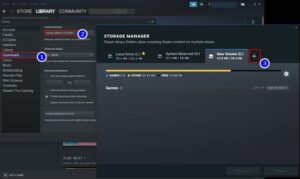
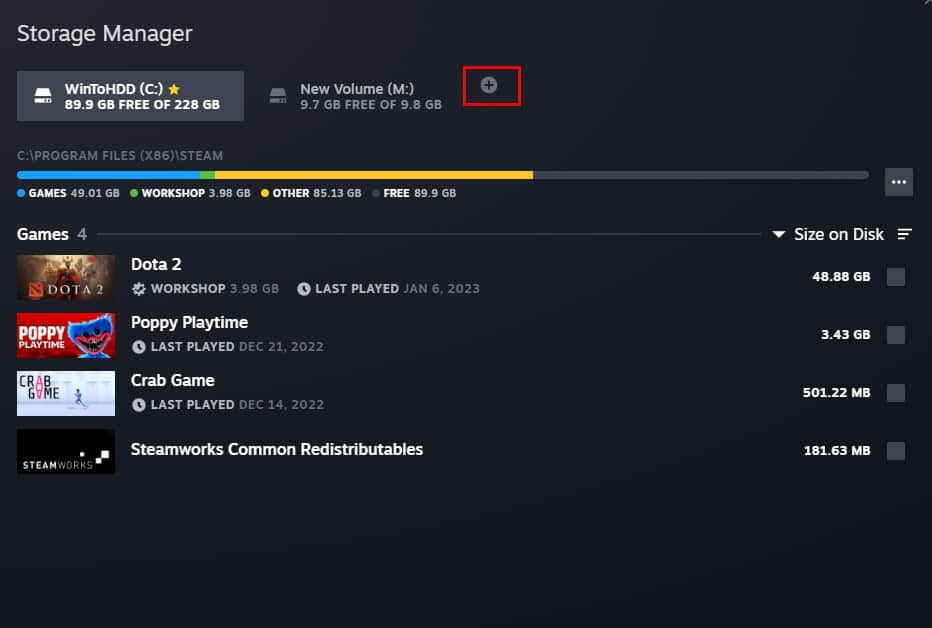
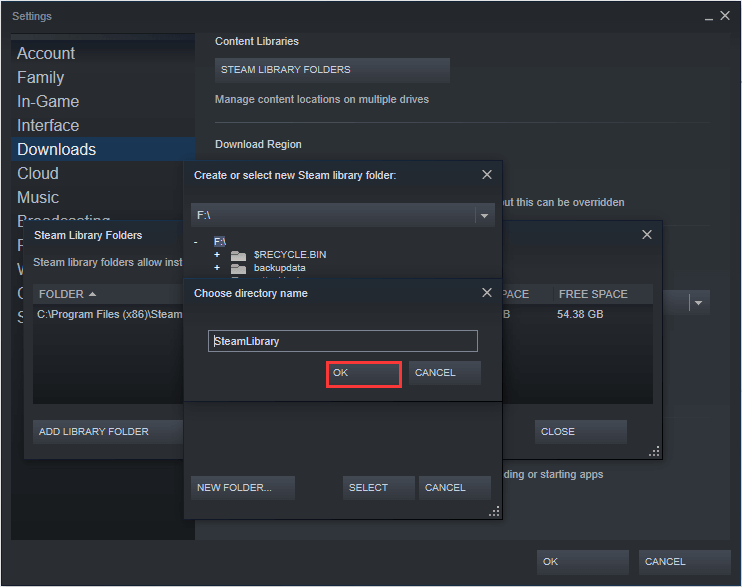
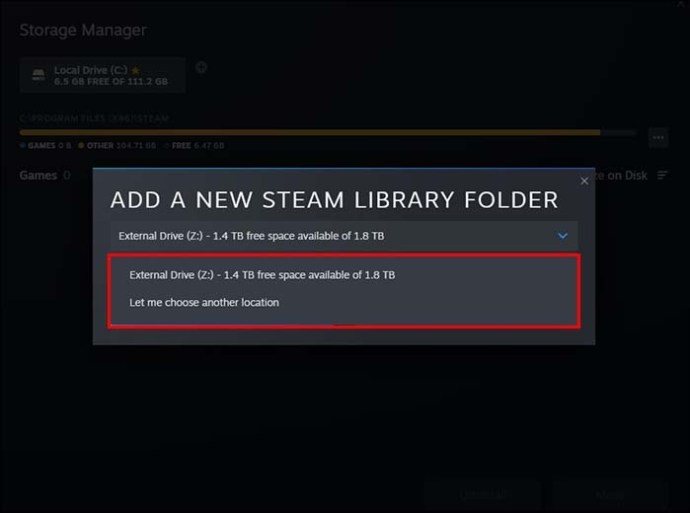
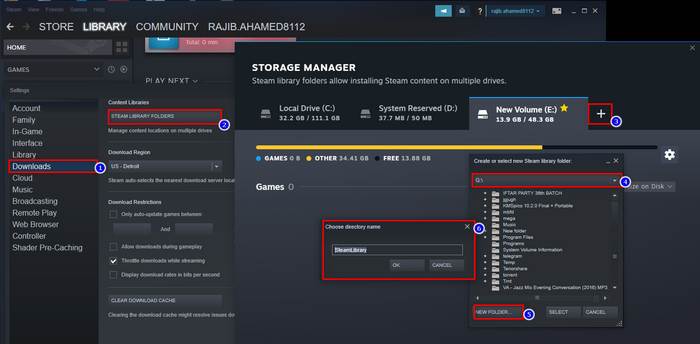
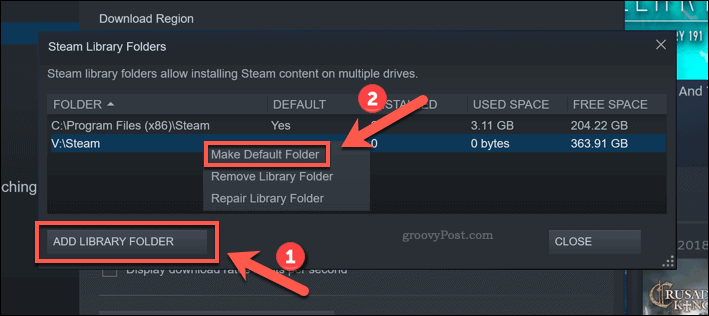
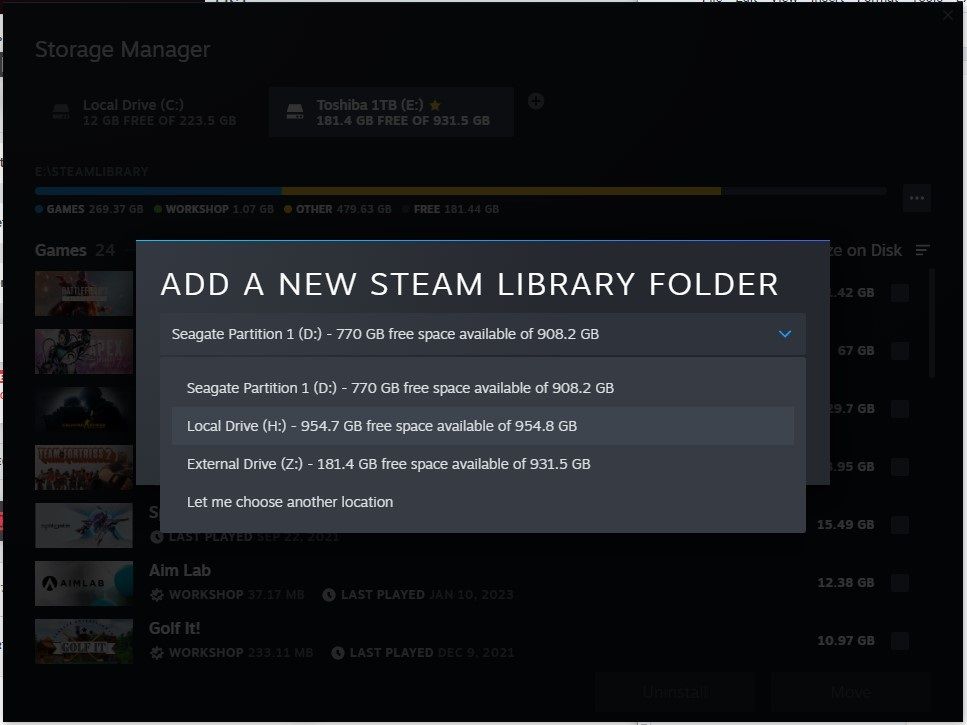
- Here you will see all your current Steam Library Folders. Click the plus icon to Add a New Drive.
- Choose the new drive or folder where you want to install future games.
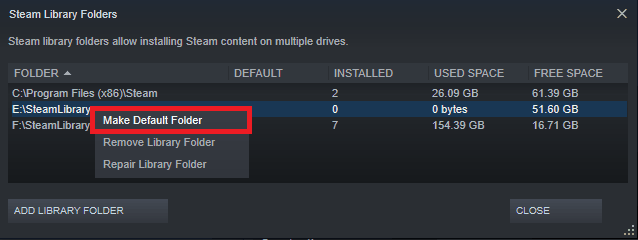
- You can then set this new location as your default by clicking the three dots next to it and selecting Make Default.
This process creates a new Steam Library Folder allowing you to install new games directly to your preferred drive whether it's a speedy NVMe SSD or a large capacity HDD for less demanding titles This flexibility is key for optimizing performance and managing your ever-growing game collection without constant headaches or expensive hardware upgrades you dont really need yet.
How Do I Move Already Installed Steam Games?
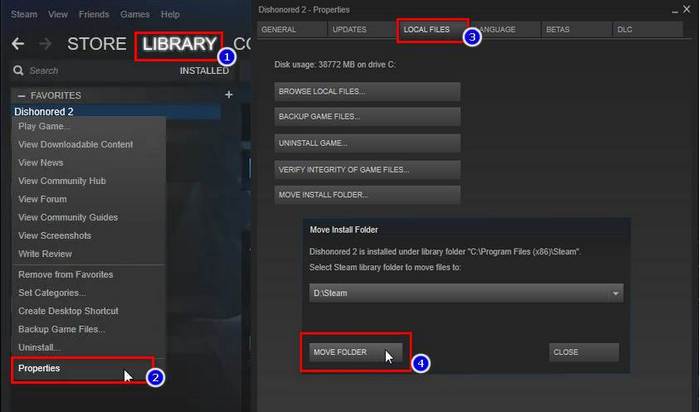
Moving games youve already installed is a common task especially when upgrading to a faster SSD or consolidating your library on a new drive Fortunately Steam provides a built-in feature that makes this process relatively painless saving you from tedious re-downloads or manual file transfers.
Heres how to do it:
- Open your Steam client and go to Settings then Storage.
- You'll see a list of your Steam Library Folders and the games installed in each.
- Select the drive where the game you want to move is currently located.
- Tick the box next to the game(s) you wish to move.
- Click the Move button at the bottom of the window.
- Choose the target Steam Library Folder where you want to relocate the game(s).
- Click Move.
Steam will then handle all the file transfers and update its internal records ensuring the game remains playable in its new location This feature is a lifesaver for gamers who need to balance space across multiple drives without losing valuable play time Its far more reliable than manually cutting and pasting files which can often lead to corrupted installations or Steam being unable to locate the games.
Why Is Knowing This Folder Location Important for Modding?
For many gamers modding is an essential part of the experience extending game life adding new content or simply tweaking visuals to perfection For titles like Skyrim or Fallout which continue to thrive thanks to robust modding communities knowing the precise steam game installation folder is non-negotiable Most mods whether manually installed or managed by a tool like Nexus Mod Manager require direct access to the game's files.
When you want to install custom textures new characters or even entire expansion-sized content packs you need to place these files directly into specific subfolders within the game's installation directory Without this knowledge you risk installing mods incorrectly leading to crashes game instability or simply the mods not working at all For the 60 percent of gamers who enjoy diving into enhanced experiences understanding this folder structure is the gateway to a personalized and endlessly replayable gaming universe It empowers you to experiment troubleshoot and truly make a game your own.
What Happens If I Delete Files from the Steam Game Folder?
Deleting files directly from your Steam game installation folder manually can have significant and often negative consequences While you might be tempted to free up space by deleting what looks like unnecessary files this is generally not recommended unless you know exactly what youre doing and why Every file within a game's folder whether it's an executable a texture file a sound clip or a configuration setting is there for a reason and plays a role in the game's functionality.
If you delete critical game files Steam will likely detect an inconsistency The next time you try to launch the game Steam will perform a file integrity check It will then redownload any missing or corrupted files which can take time and negate any space savings you thought you achieved In a worst-case scenario if you delete core files you might prevent the game from launching entirely requiring a full reinstallation Deleting save files or mod files might be acceptable if you know what you're doing but for core game assets always let Steam manage the deletion through its uninstall process or its verify file integrity feature.
How Can Multiple Steam Library Folders Help Me?
Utilizing multiple Steam Library Folders is a powerful strategy for optimizing your gaming setup particularly for those with diverse storage solutions and a vast game library Imagine you have a blazing-fast NVMe SSD for your competitive esports titles that demand minimal load times and a larger slower HDD for single-player narrative-driven games or older classics that dont require cutting-edge performance.
By setting up multiple library folders you can allocate games strategically:
- Install high-performance games like Cyberpunk 2077 or Alan Wake 2 (trending titles this month) on your fastest SSD for optimal load times and smoother gameplay.
- Place larger less performance-critical games such as strategy titles or indie gems on a spacious HDD saving precious SSD space.
- Separate work-in-progress modding projects or experimental game versions onto a dedicated drive to prevent conflicts with your main stable installations.
This approach allows you to make the most of your hardware budget balancing speed with capacity without constant reinstallation or digital juggling It offers incredible flexibility for gamers who want the best experience for every title in their collection without breaking the bank on a single massive SSD.
Does the Installation Folder Affect Game Performance?
Yes the location of your steam game installation folder absolutely affects game performance particularly in terms of load times and sometimes texture streaming or asset loading during gameplay The primary factor here is the type of storage drive your game is installed on.
- Solid State Drives SSDs and NVMe Drives: Games installed on these drives will load significantly faster than those on traditional Hard Disk Drives HDDs NVMe drives are even faster than SATA SSDs This means quicker launches shorter loading screens between levels and faster asset streaming in open-world games which can reduce stuttering and improve overall fluidity.
- Hard Disk Drives HDDs: While offering larger storage capacity at a lower cost HDDs are much slower Their mechanical nature means longer load times and potentially slower asset loading which can lead to texture pop-in or minor stutters especially in modern graphically intensive titles.
For competitive gamers where every second counts installing games on an SSD is a no-brainer Even for casual players the improved quality of life from reduced waiting times is a significant benefit With 87 percent of US gamers reporting regular play optimizing performance is key to maximizing enjoyment and ensuring smooth stress-free sessions that fit into a busy schedule.
What If I Can't Find My Steam Games After Reinstalling Steam?
It's a common and frustrating scenario you reinstall Steam and suddenly it cant find any of your previously installed games Dont panic this is usually easily fixable and doesnt mean your games are gone forever This issue often arises because Steam didnt automatically re-index your existing Steam Library Folders after the reinstallation or update.
Here's how to resolve it:
- Open your newly reinstalled Steam client.
- Go to Steam Settings then Storage.
- You'll likely only see the default Steam Library Folder (if any).
- Click the plus icon to Add a New Drive.
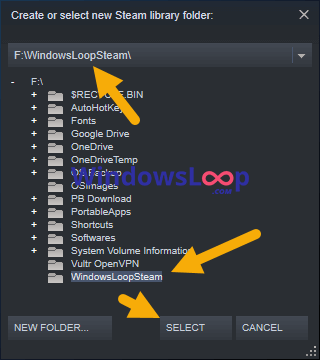
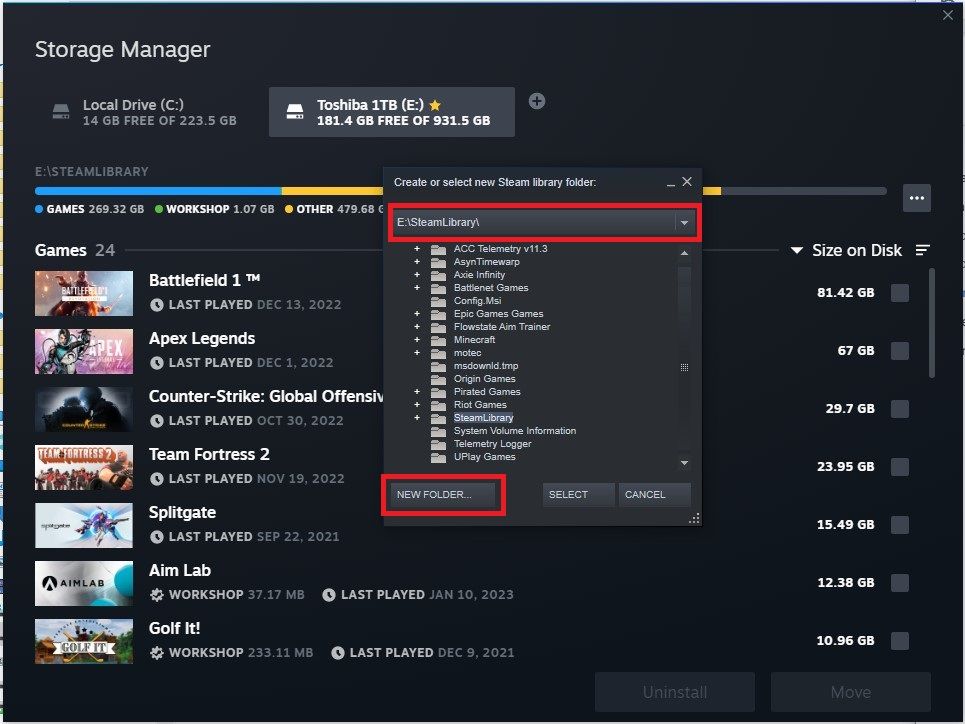
- Navigate to the drive and folder where your old Steam games are physically stored (e.g. D:SteamLibrary).
- Select that folder. Steam will then scan it recognize your installed games and automatically add them back to your library.
Once added your games will reappear in your Steam library as installed and ready to play This method saves you from having to re-download potentially hundreds of gigabytes of game data allowing you to get back into your favorite titles like Helldivers 2 or whatever you're currently enjoying much faster.
Are There Tools to Manage Steam Game Installation Folders?
Yes while Steam offers robust built-in management tools for its game installation folders there are also third-party applications that can further enhance your control and provide additional functionalities These tools can be particularly useful for advanced users or those who want even more granular control over their game files and storage.
Some popular types of tools include:
- Steam Library Manager: Dedicated third-party applications specifically designed to help you move games between different Steam Library Folders more easily or even manage game files outside of Steam's direct control. They often offer a more visual interface than Steam's built-in options.
- Disk Cleanup Utilities: Programs like CCleaner or Windows' native Disk Cleanup can help identify large or unnecessary files that might be cluttering your drives including residual files from old game installations or mods.
- File System Tools: Advanced users might utilize tools like Directory Opus or even command-line utilities for complex file management tasks especially when dealing with symbolic links or hard links to manage game files across different locations without duplicating them.
While Steam's own Storage Manager is excellent for most users these external tools can provide additional layers of control and analysis for optimizing your game installation folders and overall PC performance.
Mastering your Steam game installation folder is more than just a technical chore its about empowering your gaming life Whether youre a parent squeezing in a quick session after the kids are asleep or a professional de-stressing with some virtual adventure understanding these basics means less troubleshooting and more actual playtime Its about optimizing your precious free time and ensuring your digital escapes are as smooth and enjoyable as possible. By knowing where your games live how to move them and why it all matters youre not just a player youre a game manager a system optimizer and a savvy consumer of digital entertainment.
What's your biggest gaming challenge when it comes to managing your digital library? Comment below and let's conquer it together!
FAQ Section: Quick Answers for Busy Gamers
How do I back up my Steam game folder?You can back up a Steam game by right-clicking it in your library selecting Properties then Local Files and choosing Backup Game Files This creates a playable backup on another drive or storage media Alternatively you can simply copy the entire game folder from your SteamAppscommon directory to an external drive for manual backup.
Can I share a Steam game folder across multiple PCs?While you can copy a game folder to another PC sharing a single installation across multiple PCs via a network drive is generally not officially supported by Steam and can lead to performance issues or integrity errors Its best to install games locally on each machine or use Steam Family Sharing.
What's the default Steam game installation path on Windows?The default Steam game installation path on Windows is typically CProgram Files x86Steam If you changed it during the initial Steam installation it will be in that custom location.
Is it safe to move individual game folders manually?Manually moving individual game folders by cutting and pasting them is generally not safe as Steam may lose track of them Instead use Steams built-in 'Move Install Folder' feature or the 'Add Library Folder' option to ensure proper file integrity and recognition.
How do Steam game folders handle updates?Steam automatically manages game updates within their respective installation folders When an update is released Steam downloads the necessary files and patches them into the existing game data ensuring your game is always up-to-date without manual intervention.
What if my Steam game installation folder is taking up too much space?If your Steam game installation folder is consuming too much space consider using Steams built-in Storage Manager to move less frequently played games to a larger slower drive or uninstall games you no longer play Regularly check for and delete old save files or mod remnants not managed by Steam.
What Are Steam Library Folders and How Do They Work?
Steam Library Folders are user-defined directories where Steam installs games You can have multiple Library Folders across different drives allowing you to organize games by drive type e.g. SSD for fast games HDD for large archives Steam uses a manifest file in each folder to track installed games and their files.
How Do I Verify the Integrity of Game Files in My Steam Folder?
To verify game files right-click a game in your Steam Library select Properties then Local Files and click Verify integrity of game files Steam will scan the installation folder compare files with its server and redownload any corrupted or missing files ensuring a pristine installation.
Why Should I Create Multiple Steam Library Folders?
Creating multiple Steam Library Folders lets you optimize storage and performance You can install demanding games on fast SSDs and less critical games on larger HDDs This improves load times for key titles and efficiently uses varied storage devices on your PC.
Locate Steam game installation folder for better management Move games between drives for performance and storage Fix common issues by understanding folder structure Enable modding and custom content efficiently Manage multiple Steam library folders for flexibility Understand impacts on game performance for optimization
35
How To Find Where A Steam Game Is Installed On Your PC Install Folder . How To Add A New Steam Library Folder Latest Guide 2024 Add Library Folder . How To Locate The Steam Folder On Windows 10 A Step By Step Guide . Steam Community Guide Lethal Company How To Download Mods. Move The Install Folder For A Steam Game Easy Steps 2024 Guide Steam Folder Shift 300x179

How To Move The Install Folder Of A Game On Steam Techozu How To Change Your Steam Library Folder . How To Change Where Steam Installs Games Add A New Drive . How To Change Steam Download Install Location Folder Select New Install Directory Steam 260920 . How To Use Steam S Storage Manager To Quickly Manage Your Games Choosing A Steam Library Folder Location . Where Are Steam Games Stored And How To Change Their Location Guiding Where Are Steam Games Stored 19

Move The Install Folder For A Steam Game Easy Steps 2024 Guide Stem Library . Where Are Steam Games Stored And How To Change Its Location Change The Default Folder Of Steam . How To Change Steam Install Location In Windows 10 Choose Directory Name . How To Get To Steam Folder Alertszoom S9pWu . Where Are Steam Games Stored A Guide To Finding Their Location Change Steam Game Location 3


How To Get To Steam Folder Vivainput Steam Remote Folder Game Folder Inside . Steam March 2026 Client Update Adds Hardware Specs To User Reviews Steam Client Mar 2026 . How Can I Change Where Steam Installs Games Ask Ubuntu 58HjR . How To Change The Install Location Of Steam Games Chipp In Tech News Steam Make Default . Where Are Steam Games Installed TechCult Local Files Section In Properties Window In Steam 768x549


How To Move The Install Folder For A Steam Game Technipages Steam Move Install 3 . Opening The Game Folder On Steam . Windows 7 How To Configure Steam To Download Games To A Custom Yh8LB . How To Move The Install Folder Of A Game On Steam Techozu Steam Game Properties 768x488 . Where Is The Steam Folder Steam Library



Steam Now Lets You Move Specific Game Folders Extremetech Images 2 . GTA 5 Enhanced Install Location Steam Epic Games Rockstar Game Image 123 1024x649 . Where Are Steam Games Stored And How To Change Its Location Userdata And Steam Folder In Steam Install Directory . How To Find Steam Exe In 2026 PC Game Guide Screenshot Windows File 1 . How To Install Games On Steam 2026 Beginner S Guide YouTube


Where Are Steam Games Stored And How To Change Their Location Guiding Where Are Steam Games Stored 7 1024x771 . Steam Community Guide Steam Wants You To Install An Already. Move The Install Folder For A Steam Game Easy Steps 2024 Guide Steam Folder Creat . How To Move Steam Games To Another Drive Steam Add Library Folder . How To Play Steam Games On An External Drive Using The Steam Storage Adding New Steam Library Folder